How to Remove a TV Screen Protector — Safe Step-by-Step Guide
Removing a TV screen protector is something most people expect to be difficult — and end up making more complicated than it needs to be.
If your screen protector uses static cling and no adhesive — which is what Screen Guardian and most quality TV screen protectors use — removal is straightforward, takes under 5 minutes, and leaves absolutely no residue on your TV panel.
If your screen protector uses adhesive — a less common but problematic format — removal requires more care. This guide covers both.
Read the right section for your protector type and follow the steps in order.
First — What Type of Screen Protector Do You Have?
Static cling (no adhesive) This is the correct format for TV screen protectors. The film holds to your panel via electrostatic charge — the same way a balloon sticks to a wall after being rubbed. No glue. No tape. No chemical contact with the panel surface.
If your protector is static cling — removal is simple. Go to the Static Cling Removal section below.
How to tell: Lift one corner with a fingernail. If it peels away cleanly with no stretching or resistance, it is static cling. If it stretches and resists, it uses adhesive.
Adhesive-backed protector Some lower-quality TV screen protectors use a thin adhesive layer. These are harder to remove and require more care. Go to the Adhesive Removal section below.
Rigid acrylic or polycarbonate panel These are hard panels mounted on a frame or clipped to the TV bezel. Removal is different again — go to the Rigid Panel Removal section.
Why You Might Need to Remove Your Screen Protector
Replacing a worn protector After 2–3 years of normal use, a screen protector will show its own surface wear — micro-scratches from cleaning, slight yellowing in some cases. Removing and replacing it reveals a factory-fresh panel underneath.
Removing for TV service TV service technicians occasionally ask for the screen protector to be removed before a service visit — particularly for software-related issues where they need to assess the panel condition directly.
Reinstalling after cleaning a bubble If a dust bubble appeared under the film during installation, removing and reapplying is the correct fix. Static cling protectors can be removed and reapplied multiple times without damage.
Replacing with a different variant If you installed crystal clear and want to switch to anti-glare for a brighter room — or vice versa — removal is the first step.
Moving the TV to a new room Some buyers remove the protector before moving a TV to avoid creasing it during the move, then reapply in the new location.
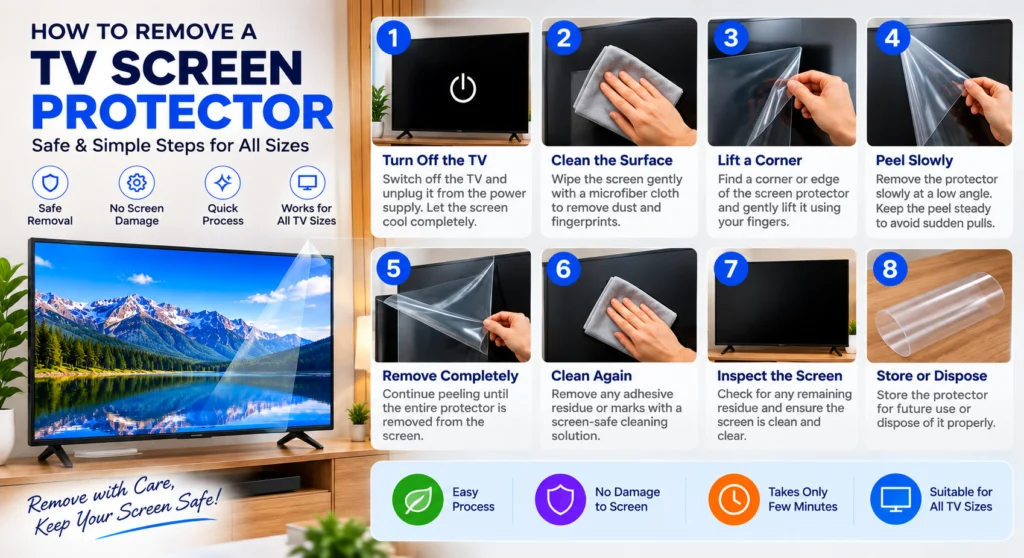
How to Remove a Static Cling TV Screen Protector
This is the correct method for Screen Guardian protectors and most quality TV screen protectors sold in India.
What you need
- A fingernail or a soft flat card (credit card, loyalty card)
- A microfibre cloth (optional — for cleaning after removal)
- Nothing else
Step 1 — Turn the TV off
Switch the TV off at the wall socket — not just standby. A running TV generates static charge that can make the film more reluctant to lift cleanly at the edges.
Wait 5 minutes for the panel to cool and the static charge to dissipate.
Step 2 — Choose a corner to start
Start at one of the four corners of the screen protector — not the middle of an edge. Corners give you the best leverage for the initial lift.
The top corners are easier to reach on most TVs. The bottom corners work equally well if the TV is wall-mounted at a height where the top corners are hard to access.
Step 3 — Lift the corner
Use a fingernail to gently press into the gap between the protector edge and the TV bezel. Slide the fingernail under the corner of the film and lift gently upward.
If your fingernails are very short, use the corner of a soft flat card — a credit card, loyalty card, or business card. Slide it flat under the corner at a shallow angle. Do not use metal objects — a metal card or key can scratch the TV panel surface.
The corner will lift cleanly. You will feel the static cling release — a very slight resistance followed by clean separation.
Step 4 — Peel at a low angle
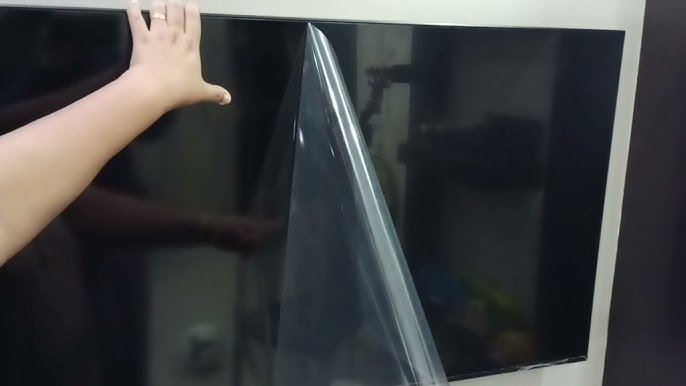
Once the corner is lifted, peel the protector away from the screen at a low angle — approximately 30 to 45 degrees from the screen surface.
Do not peel at a sharp angle (90 degrees or more). Peeling straight up creates more static charge and can cause the film to spring back toward the panel, picking up dust in the process.
Peel slowly and steadily. There should be no stretching, no resistance, and no sound. If you feel significant resistance, stop — you may have an adhesive protector, not static cling. Go to the adhesive section below.
Step 5 — Support the film as you peel
As the protector peels away from the screen, use your other hand to support the lifted portion of the film. Hold it loosely — do not fold it back on itself.
If the film folds or creases during removal it may not lie flat if you want to reapply it. Supporting the film as you peel preserves it for reuse.
Step 6 — Complete removal
Continue peeling from corner to corner until the film is fully removed. The last edge will release cleanly.
For 65 and 75 inch TVs — two-person removal is recommended. Person 1 peels from one corner, Person 2 supports the growing free portion of the film to prevent it from folding or touching the screen surface during removal.
Step 7 — Inspect the panel surface
After removal, look at your TV panel surface under direct light at a 45-degree angle.
You should see: A clean, residue-free panel in exactly the same condition as when the protector was first applied. Static cling leaves zero residue.
If you see marks: Check whether they were scratches on the protector surface that are no longer there (meaning the panel beneath is clean), or actual marks on the panel itself. Scratches on the panel that were not there before are extremely rare with static cling protectors — if you see any, contact Screen Guardian support.
Step 8 — Clean the panel (optional)
If you plan to reapply a new protector immediately, clean the panel surface with a microfibre cloth — top to bottom, one direction, light pressure — before applying.
If you are leaving the panel unprotected, a standard gentle wipe with a dry microfibre cloth is all that is needed.
How to Remove an Adhesive TV Screen Protector
If your screen protector uses adhesive, removal requires more care. Adhesive-backed protectors on TV panels are not recommended — this section is for buyers who have one and need to remove it safely.
Step 1 — Warm the adhesive very gently
Adhesive releases more easily when slightly warm. Use a hair dryer on its lowest heat setting held 30cm from the screen surface. Move the dryer constantly — never hold it still. Warm one section of the protector edge for 20–30 seconds only.
Do not apply heat directly to an OLED TV panel. OLED panels are heat-sensitive. If you have an LG or Sony OLED TV with an adhesive protector — do not use heat. Skip this step and proceed directly to Step 2 with extra patience.
Step 2 — Lift one corner with a soft card
Use a soft flat card — not metal — to lift one corner of the adhesive protector. Work slowly. Adhesive protectors stretch when pulled too fast, which makes them harder to remove cleanly.
Step 3 — Peel at a very low angle
Peel at 15–20 degrees from the screen surface — much shallower than static cling removal. This low angle reduces the stress on the adhesive bond and minimises the risk of leaving residue.
Pull slowly and steadily. If the film tears, stop and restart from the tear point with the card.
Step 4 — Remove adhesive residue
Adhesive protectors almost always leave some residue on the panel surface. Do not use alcohol, acetone, or chemical solvents on a TV panel — these damage anti-reflective coatings permanently.
Safe residue removal: Take a piece of the adhesive protector you just removed and press it gently against the residue — the adhesive picks up itself. Repeat until the residue is gone.
Alternatively, a microfibre cloth with very gentle circular pressure can lift light adhesive residue. Work slowly and do not press hard.
How to Remove a Rigid Acrylic or Polycarbonate TV Panel
Rigid panels are mounted on a frame or clipped to the TV bezel rather than sitting on the panel surface.
Frame-mounted panels: Locate the mounting screws or clips at the edges of the frame. Remove the screws with a screwdriver or release the clips by pressing inward. Lift the frame away from the TV. The panel comes with it.
Clip-mounted panels: Locate the clips along the top or side edges of the bezel. Press each clip inward while pulling the panel gently forward. Work from one side to the other — do not force any single clip.
After removal, check the TV bezel for any marks from the clips before deciding whether to reinstall a rigid panel or switch to a static cling nano-film protector.
After Removal — What Next?
If your panel is scratch-free: Your panel is in perfect condition. Apply a new Screen Guardian protector immediately to maintain that protection going forward.
If your panel has existing scratches: Scratches on the TV panel coating cannot be repaired — they are permanent. A new screen protector will hide minor surface scratches from certain viewing angles but will not remove them. The most important thing now is preventing further damage with a new protector.
If you want to switch from crystal clear to anti-glare — or vice versa: You can apply the new variant immediately after removing the old one. Clean the panel surface first with the included microfibre cloth before applying.
Frequently Asked Questions
Will removing my screen protector damage the TV panel?
No — if it is a static cling protector. Static cling leaves zero residue and zero marks on the panel surface. The panel underneath will be in exactly the condition it was in when you first applied the protector.
Can I reuse my screen protector after removing it?
Yes — if it was removed carefully without creasing or tearing. Clean any dust from the inner surface before reapplying. A creased protector will not lie flat and should be replaced.
How do I remove a screen protector from a wall-mounted TV? Exactly the same process. Wall-mounted TVs are actually easier to work with during removal because the TV is at a fixed height and stable. Peel from the top corner downward.
Do I need to turn the TV off to remove the screen protector? Yes — off at the wall socket for 5 minutes before removal. This reduces panel static charge and makes the initial corner lift easier.
My screen protector is stuck and will not lift — what do I do? If it is genuinely not lifting, it is likely adhesive-backed rather than static cling. Use the soft card method described in the adhesive removal section above. Never pull hard on a stuck protector — you risk the film tearing and leaving pieces on the panel.
How long does removal take? 2–3 minutes for 32–43 inch (solo). 3–5 minutes for 55–65 inch (two people recommended). 5 minutes for 75 inch (two people).
Will removal void my TV warranty? No. Static cling protectors make no chemical contact with the TV panel. No TV manufacturer’s warranty is affected by the application or removal of a static cling screen protector.
Ready to Replace Your Protector?
If you are removing your old protector to replace it with a new Screen Guardian protector — your replacement is ready to order and ships pan India within 24 hours.
Shop Screen Guardian TV Screen Protectors →
Shop by size:
- 32 Inch TV Screen Protector
- 43 Inch TV Screen Protector
- 50 Inch TV Screen Protector
- 55 Inch TV Screen Protector
- 65 Inch TV Screen Protector
- 75 Inch TV Screen Protector
Related guides: How to Install a TV Screen Protector · How to Remove Air Bubbles from a TV Screen Protector · Anti-Glare vs Crystal Clear TV Screen Protector