
How to Measure Your TV for the Right Screen Protector Size
Ordering the wrong size is the most common mistake people make when buying a TV screen protector. A protector that is too small leaves your screen exposed at the edges. One that is too large simply will not fit.
The good news: measuring your TV correctly takes less than two minutes, and you only need a measuring tape.
This guide explains exactly how to do it — and what to do if you do not have a measuring tape handy.
Why TV Size Labels Are Not Always Accurate
When you bought your TV, it was labelled as 55 inch or 65 inch. But here is the thing — that number is a nominal size, not an exact measurement. Manufacturers round up or down slightly, and two different brands may have slightly different actual screen dimensions even at the same nominal size.
For example:
- A Samsung 55 inch TV and an LG 55 inch TV may differ by a centimetre or two in actual screen width
- An older model and a newer model of the same brand may also differ
This is why TV screen protectors are manufactured to standard nominal sizes (43″, 50″, 55″, 65″, 75″) that fit a range of actual measurements within that bracket. As long as your measured diagonal falls within the right range, the protector will fit.
What You Need
- A flexible measuring tape (the kind used for tailoring works best)
- Or a rigid ruler if measuring in sections
That is all. No tools, no special equipment.
How to Measure Your TV Screen — Step by Step
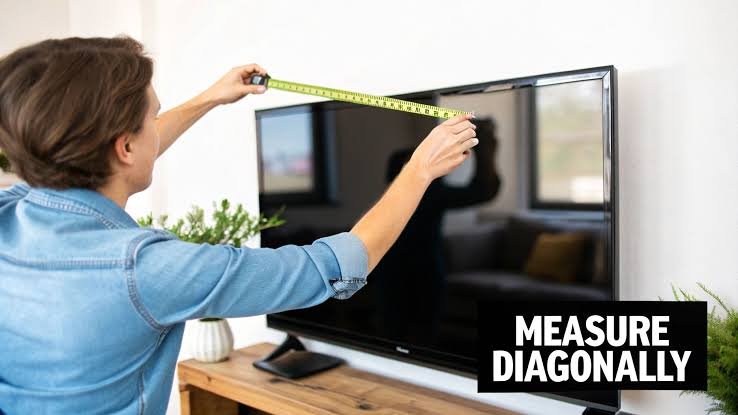
Step 1: Locate the corners of the screen
Stand in front of your TV. You need to measure the screen only — not the plastic bezel (border) around it, not the stand, not the overall TV unit.
The screen starts where the actual display begins, just inside the bezel edge.
Step 2: Measure diagonally
Place the start of your measuring tape at the top-left corner of the screen (inside the bezel). Stretch it diagonally to the bottom-right corner of the screen (inside the bezel).
Read the measurement. This is your screen’s diagonal size.
Alternatively, measure from the top-right corner to the bottom-left corner — the result will be the same.
Step 3: Convert to inches if needed
If your measuring tape shows centimetres, divide by 2.54 to get inches.
For example: 139 cm ÷ 2.54 = 54.7 inches → this is a 55 inch TV
Step 4: Match to the nearest standard size
Use this table to find your screen protector size:
| Measured Diagonal | Order This Size |
|---|---|
| 105 – 112 cm (41″ – 44″) | 43 inch |
| 122 – 129 cm (48″ – 51″) | 50 inch |
| 136 – 142 cm (53.5″ – 56″) | 55 inch |
| 160 – 167 cm (63″ – 66″) | 65 inch |
| 187 – 193 cm (73.5″ – 76″) | 75 inch |
What If I Do Not Have a Measuring Tape?
If you do not have a measuring tape at home, there are two other ways to find your TV size:
Option 1: Check the model number
Look at the sticker on the back of your TV. Your model number almost always contains the screen size.
Common examples:
- Samsung UA55AU7700 — the “55” tells you it is a 55 inch TV
- LG 65UP8000PTZ — the “65” is the screen size
- Sony KD-55X74K — “55” is the screen size
- TCL 65C635 — “65” is the screen size
- Mi TV 4X 43 — “43” is the screen size
Search your model number on Google if you are unsure — the spec page will confirm the exact screen size.
Option 2: Check your purchase invoice or box
Your TV box, invoice, or warranty card will clearly state the screen size. This is the simplest option if your TV is relatively new.
Option 3: Use a piece of string
If you have no measuring tape but have a long piece of string or ribbon, stretch it diagonally across the screen, mark the length with your finger, then measure that length against a ruler.
TV Size Chart for Popular Indian Models
Here is a quick reference for common TV models sold in India:
Samsung
| Model | Size | Screen Protector to Order |
|---|---|---|
| UA43T5300 | 43″ | 43 inch |
| UA50AU7700 | 50″ | 50 inch |
| UA55AU7700 | 55″ | 55 inch |
| QA55Q60B | 55″ | 55 inch |
| UA65AU8000 | 65″ | 65 inch |
| QA65Q70B | 65″ | 65 inch |
LG
| Model | Size | Screen Protector to Order |
|---|---|---|
| 43UP7500PTZ | 43″ | 43 inch |
| 50UP8000PTZ | 50″ | 50 inch |
| 55UP8000PTZ | 55″ | 55 inch |
| 55C3PSA (OLED) | 55″ | 55 inch |
| 65UP8000PTZ | 65″ | 65 inch |
| 65C3PSA (OLED) | 65″ | 65 inch |
Sony
| Model | Size | Screen Protector to Order |
|---|---|---|
| KD-43X74K | 43″ | 43 inch |
| KD-50X74K | 50″ | 50 inch |
| KD-55X74K | 55″ | 55 inch |
| KD-55X80K | 55″ | 55 inch |
| KD-65X74K | 65″ | 65 inch |
| KD-65X80K | 65″ | 65 inch |
TCL
Mi / Xiaomi
Does the TV’s Frame or Bezel Affect the Fit?
No. A TV screen protector is sized to fit the screen area only — it sits in front of the display and does not attach to or overlap the bezel.
Whether your TV has a thin bezel, thick bezel, or borderless design, the protector fits the same way. The static cling holds it against the screen surface itself.
Crystal Clear or Anti-Glare — Which Should You Choose?
Once you know your size, the next decision is the type of protector.
Crystal Clear is the right choice if:
- Your TV is in a dark room or home theatre
- You have an OLED TV (LG C3, G3, Sony A80K, etc.)
- Picture quality is your top priority
Anti-Glare (Matte) is the right choice if:
- Your TV faces a window or bright light source
- Your living room has overhead lighting that reflects on the screen
- You watch TV during the day with sunlight in the room
Both types are available for all sizes at Screen Guardian.
Frequently Asked Questions
My TV is 55 inch but the measurement shows 54.7 inches — is that right?
Yes, that is completely normal. TV sizes are nominal (rounded) measurements. A 54.7 inch measurement is a 55 inch TV. Order the 55 inch screen protector
I measured 138 cm — what size do I need?
138 cm ÷ 2.54 = 54.3 inches. That is a 55 inch TV. Order the 55 inch screen protector.
Can I use a 65 inch protector on a 63 inch screen?
No. A protector must match the nominal size of your TV. A 65 inch protector is made for 65 inch screens and will be too large for a 63 inch screen.
What if my TV size is not listed — like 32 inch or 85 inch?
Currently Screen Guardian offers protectors for 43, 50, 55, 65, and 75 inch TVs — the most common sizes in Indian homes. Email us at support@screenguardian.in if you need a different size and we will let you know when it becomes available.
I bought my TV from Amazon or Flipkart. How do I confirm the size?
Check your order history on the app or website. The product listing will show the screen size clearly. You can also check the model number on the TV’s back sticker using the guide above
Summary
Measuring your TV for a screen protector is simple:
- Measure diagonally across the screen (not including the bezel)
- If in cm, divide by 2.54 to get inches
- Match to the nearest standard size: 43″, 50″, 55″, 65″, or 75″
- Choose crystal clear (dark room / OLED) or anti-glare (bright room / LED)
Not sure? Email us at support@screenguardian.in with your TV model number and we will confirm the right size for you within 24 hours.

4 thoughts on “How to Measure Your TV for the Right Screen Protector Size”
Pingback: Best TV Screen Protector India 2026 — Buying Guide for Every Size & Brand
Pingback: Is It Good to Use a TV Cover? When It Helps and When It Harms
Pingback: Is 43 Inch TV Actually 43 Inch? Real Size and Protector Fit
Pingback: 55 Inch TV Width in cm: Standard 16:9 Screen Size Guide