LG TV White Spot — What Is It and How to Prevent It (2026)
You noticed a white spot on your LG TV screen. It appeared without warning — a bright, circular patch that is visible in dark scenes and during normal viewing. You are wondering what caused it, whether it can be fixed, and what it will cost.
This guide answers all three questions honestly — and tells you exactly how to make sure it never happens again.
What Is a White Spot on an LG TV?
A white spot on an LG TV screen is almost always caused by one of two things — a dislodged reflector lens inside the panel, or physical damage to the panel surface or coating.
Cause 1 — Dislodged LED reflector lens (most common)
Inside LG LED-backlit TV panels, tiny plastic reflector lenses sit over each LED backlight point. These lenses concentrate and direct the LED light through the diffuser layers to create even backlighting across the panel.
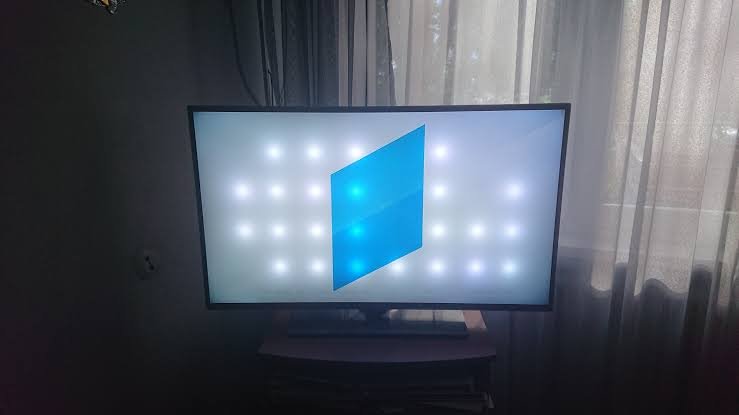
When one of these reflector lenses dislodges from its mounting — due to physical impact, heat stress from direct sunlight, or manufacturing defect — it creates a concentrated point of light that appears as a bright white spot on the screen. The lens is still illuminating, just no longer diffused correctly.
This is the most common cause of white spots on LG LED TVs. It appears as a sharp, circular, very bright white dot that is most visible against dark backgrounds and in scenes with large dark areas.
Cause 2 — Panel coating damage or pressure damage
Physical pressure on the TV panel — a finger pressed hard, an object leaning against the screen, or a child pushing on the screen — can damage the liquid crystal layer in LED panels or cause delamination in the panel coating. This appears as a white or cloudy circular or irregular patch that is not as bright as a lens-related spot but is clearly visible during viewing.
This type of damage is more common on thin modern panels where the LCD layer is closer to the surface.
Cause 3 — OLED pixel burnout or damage
On LG OLED TVs, white spots can indicate OLED pixel damage — a cluster of pixels that are stuck on or damaged by heat, impact, or prolonged static image display. This is less common than the lens issue but more expensive to address.
How Much Does LG TV White Spot Repair Cost in India?
This is the most searched question — “lg tv white spot repair cost” — and the answer depends on the cause and the TV model.
Dislodged LED reflector lens repair: This is sometimes fixable without a full panel replacement. A qualified TV technician can open the TV, locate the dislodged lens, and reattach it. Service cost at an LG authorised service centre — ₹1,500 to ₹3,500 for the service call plus parts. If the lens is missing rather than dislodged, a replacement lens kit is needed — total cost ₹3,000 to ₹6,000.
Panel replacement (if lens repair is not possible):
- LG 43 inch panel replacement: ₹8,000–₹14,000
- LG 55 inch panel replacement: ₹18,000–₹28,000
- LG 65 inch OLED panel replacement: ₹35,000–₹50,000
- LG 75 inch panel replacement: ₹45,000–₹65,000
Important: LG India’s standard warranty does not cover physical damage, impact damage, or damage caused by incorrect usage. If the white spot appeared due to any physical contact with the screen — which is the most common real-world cause — warranty coverage is unlikely. Always get a written assessment from an LG authorised service centre before paying for any repair.
Can a White Spot on an LG TV Be Fixed at Home?
For lens-related white spots — sometimes.
There are YouTube tutorials showing how to open the TV and reattach dislodged LED lenses. This requires:
- Full disassembly of the TV back panel
- Access to the LED backlight array
- Identifying the dislodged lens
- Reattaching with appropriate adhesive
This is not recommended for most users unless you have electronics repair experience. Opening a TV voids any remaining warranty. If the lens is incorrectly reattached, you risk creating additional white spots or damaging the diffuser layer. For a TV worth ₹30,000+, the risk of DIY repair usually outweighs the cost saving.
For coating or pressure damage — no. Physical panel damage cannot be repaired at home. The affected area requires professional assessment and typically panel replacement.
The Three Main Causes of LG TV White Spots in Indian Homes
Understanding what caused the white spot is the key to preventing it from happening again — on this TV or on your next one.
Cause 1 — Physical impact on the screen
The most common cause of white spots in Indian homes is physical contact with the TV panel — children pressing the screen, objects leaning against it, cleaning with pressure, or accidental impact from nearby furniture or toys.
Even moderate pressure on a modern thin LED panel can dislodge a reflector lens or damage the LCD layer. The damage may not appear immediately — it can take days or weeks for the white spot to become visible after the initial impact.
Cause 2 — Heat stress from direct sunlight
Direct sunlight on an LG TV panel for hours every day creates thermal stress. The plastic reflector lenses expand and contract with heating and cooling cycles. Over 12–18 months this repeated thermal cycling loosens the lens adhesive and eventually dislodges lenses — creating white spots that appear without any single obvious impact event.
This is why LG specifically recommends keeping TVs away from direct sunlight in their product documentation.
Cause 3 — Aggressive cleaning
Pressing hard on the screen during cleaning — particularly with a dry cloth on a dusty surface — creates localised pressure that can damage the LCD layer or dislodge lenses near the surface. This is especially common when cleaning a large-screen TV where the person leans on the centre of the screen for leverage.
How to Prevent White Spots on Your LG TV
Prevention is the only reliable strategy. Once a white spot appears, repair is expensive and not always possible. These five steps eliminate the three main causes permanently.
Step 1 — Apply a TV Screen Protector
A screen protector is the single most important preventive measure for white spot damage caused by physical contact.
When a transparent nano-film protector sits on the LG TV panel surface, any pressure applied to the screen — a child’s hand, a cleaning cloth, an accidental contact — is distributed across the protector film rather than concentrated on the panel surface beneath. The film absorbs and distributes the pressure before it can dislodge a reflector lens or damage the LCD layer.
For LG OLED panels specifically — where the organic pixel layer sits directly behind the surface coating with no buffer — a screen protector provides the protective barrier that the panel construction itself lacks.
Screen Guardian’s 55 and 65 inch protectors are precision-cut for LG TV panel dimensions and use static cling — no adhesive contacts the LG panel surface, which is important for preserving LG’s anti-reflective coating integrity.
Screen Guardian 55 Inch TV Screen Protector → — ₹2,499 Screen Guardian 65 Inch TV Screen Protector → — ₹2,999
Step 2 — Keep the TV Away From Direct Sunlight
Position your LG TV on a wall that does not receive direct afternoon sunlight. If repositioning is not possible, use UV-filtering window film on the facing window to block the UV and heat that cause thermal stress to reflector lens adhesive over time.
This is particularly important for LG OLED TVs — LG’s own product documentation advises against placing OLED panels in direct sunlight due to heat-related pixel degradation risk.
Step 3 — Clean Correctly — Never With Pressure
Wipe your LG TV with a clean, dry microfibre cloth using minimal pressure — top to bottom, one direction. Never press the cloth into the screen. Never use circular scrubbing motions that create localised pressure points.
With a screen protector installed, you wipe the protector surface — which is significantly more pressure-tolerant than the bare panel. The LG panel beneath stays completely untouched regardless of cleaning frequency.
Step 4 — Keep Children and Objects Away From the Screen
Wall-mount the TV at a height children cannot comfortably reach. Keep toy boxes, furniture, and any objects that could lean or fall against the screen away from the TV viewing area. For families with toddlers, a TV safety guard creates a physical barrier during the highest-risk years.
Step 5 — Never Press the Screen During Troubleshooting
Many TV owners press on the screen when investigating a display issue — trying to see if the spot moves, changes, or responds to pressure. This is one of the most common ways a minor issue becomes a major one. A dislodged lens that is still partially attached can be fully dislodged by pressure. Do not press on the screen — contact LG service directly.
LG TV White Spot vs Other Display Issues
| Appearance | Most likely cause | Fix |
|---|---|---|
| Bright circular white dot, visible in dark scenes | Dislodged LED reflector lens | Service centre — ₹3,000–₹6,000 |
| Cloudy white irregular patch | Pressure damage to LCD layer | Panel replacement |
| White spot that changes with pressure | LCD layer damage | Panel replacement |
| Multiple white spots appearing together | Heat stress, multiple lenses | Panel replacement |
| White spot on LG OLED | Pixel damage or burn | Panel replacement — ₹35,000+ |
| Spot visible only when TV is cold | Thermal expansion issue | Service centre assessment |
Does a Screen Protector Help if White Spots Already Exist?
Partially — for surface-related spots.
If the white spot is caused by surface coating damage, a crystal clear screen protector applied over it reduces the visibility of the spot by creating a new smooth surface over the affected area. This is the same mechanism as a screen protector reducing the visibility of surface scratches.
For lens-related white spots that appear as bright points of light — a screen protector does not reduce their visibility because the issue is internal to the panel, not at the surface.
In all cases — installing a screen protector after a white spot appears prevents any further surface damage and is worth doing regardless of whether it reduces the spot’s visibility.
Frequently Asked Questions
What causes white spots on LG TV screens?
Most commonly — dislodged LED reflector lenses inside the panel, caused by physical impact, heat stress from direct sunlight, or manufacturing defect. Less commonly — LCD layer damage from pressure or OLED pixel damage on LG OLED models.
Is LG TV white spot covered under warranty?
LG India’s standard warranty covers manufacturing defects. White spots caused by physical impact, incorrect usage, or accidental damage are typically not covered. Get a written assessment from an LG authorised service centre — they will determine whether the cause is a manufacturing defect or physical damage.
How much does LG TV white spot repair cost in India?
Lens reattachment service: ₹3,000–₹6,000. Panel replacement: ₹8,000–₹65,000 depending on TV size and model. LG OLED panel replacement is at the higher end of this range.
Can I prevent white spots from coming back after repair? Yes. Apply a screen protector immediately after repair to prevent pressure-related recurrence. Move the TV away from direct sunlight to prevent heat-stress recurrence. Follow the correct cleaning technique with minimal pressure.
Does screen protector prevent LG TV white spots? Yes — for white spots caused by physical contact and pressure. A screen protector distributes pressure applied to the screen across the film surface rather than concentrating it on the panel. This prevents the dislodging of reflector lenses and LCD layer damage that cause the most common type of white spot.
The Bottom Line
An LG TV white spot is expensive to repair — ₹3,000 to ₹65,000 depending on cause and model — and not always fixable without full panel replacement. The three causes are physical contact, heat stress from sunlight, and incorrect cleaning. All three are preventable.
A screen protector addresses physical contact — the most common cause. Moving the TV from direct sun addresses heat stress. Correct cleaning technique addresses cleaning-related pressure damage.
Screen Guardian’s LG-compatible TV screen protectors are precision-cut for all standard LG TV sizes — 32, 43, 55, 65, and 75 inch — with 99.5% transparency, 3H protection, and static cling installation that never contacts the LG panel surface with adhesive.
Shop Screen Guardian TV Screen Protectors for LG TVs →
Related reading: Scratch on TV Screen — Can It Be Fixed? · What Is an OLED TV Cover? · How to Protect Your TV From Sunlight · Does Your TV Really Need a Screen Protector?