Should We Remove a TV Screen Protector: Pros, Cons and Guide
You can keep the TV screen protector on while you watch movies or game, as long as it is clean and undamaged. You might wonder if your television truly needs this added layer, if taking it off will harm the panel, whether the accessory is worth keeping, and what disadvantages you might face.
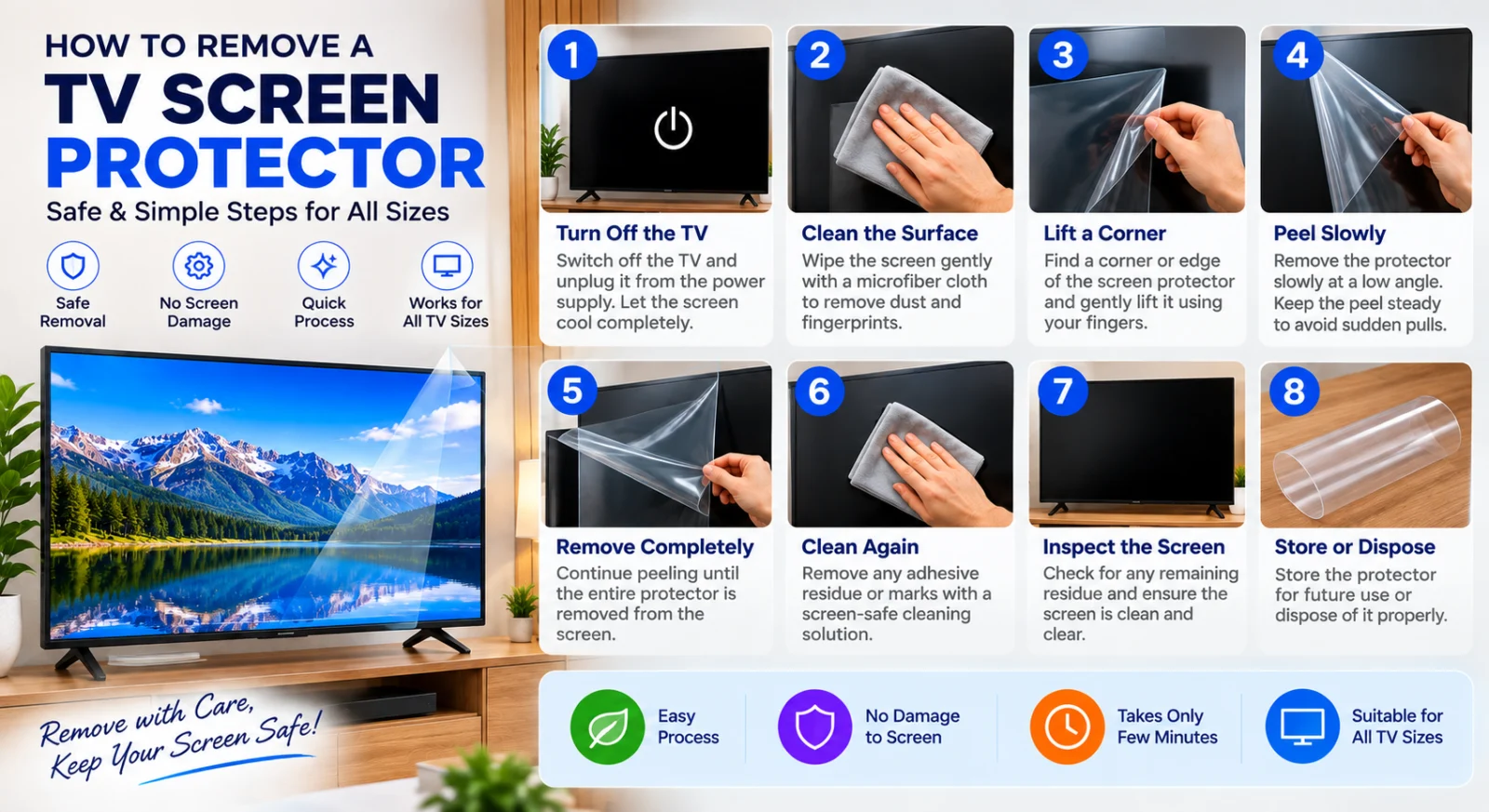
Your accessory provides anti-glare benefits and resists fingerprints to improve your viewing experience. You should wipe the surface routinely using a soft cloth dampened with water or television cleaner to clear away smudges. If you decide to install a fresh sheet, remember to take off the surrounding frame first. Keeping the glass slightly moist while applying a new layer helps you smooth out trapped air bubbles easily.
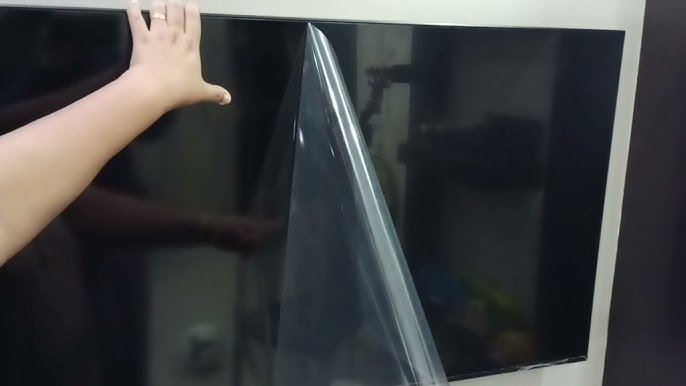
Daily use can cause the material to collect marks over time. When the surface grows too soiled or gathers heavy scratches, simply peel off the old layer and apply a new protector.
Does a TV need a screen protector?
You can clear away dust and fingerprints by using a lint-free cloth that has been dampened with water or a flat-screen TV cleaner. Over time, you might need to remove your screen protector because it shows typical surface wear after a couple of years of normal use, such as minor cleaning scratches or slight yellowing. If the protector becomes too dirty from daily smudges and regular use, simply peel it off and replace it with a fresh one to keep your viewing experience clear.
Will removing a screen protector damage the screen?
Removing a screen protector generally will not damage your TV screen, provided you follow proper steps and avoid confusing the removable layer with the actual manufacturing panel. Manufacturers note that you should never peel away the surface material found on the corners or sides of the actual TV panel itself. However, if you are peeling off a removable third-party screen protector because it has gathered too much dirt, or because it has become worn down over years of normal use and cleaning with small scratches or yellowing, you can safely take it off.
Is a TV screen protector worth it?
While some people report that a protector can save a screen from harm, others note that protectors can end up permanently damaging the screen instead. If you do choose to use one, proper installation matters. You might find it easier to smooth out the protector and push out air bubbles if the screen is kept slightly damp during application, rather than drying it completely beforehand.
What are the drawbacks of using a screen protector?
You might notice several drawbacks when using a screen protector on your television or other devices. If the protector becomes too dirty with fingerprints and smudges that you cannot simply wipe away with a damp lint-free cloth, you will need to peel it off entirely.
Additionally, using protective layers on screens can sometimes lead to unexpected issues. For instance, putting a cover on a device can cause marks rather than preventing them, which defeats the original purpose. If your screen protector reaches a point where it is excessively worn or dirty, the practical solution is to remove it and replace it with a new one.
How much does a TV screen protector cost?
You do not need to worry about any financial cost for a screen protector when deciding whether to keep or remove it, as specific monetary values are not detailed here. Instead, you should focus on the physical condition of the layer currently on your display. If the material eventually gets to a point where it is simply too soiled to clean properly, you will have to take it off and put a fresh one in its place.
Before you even reach that stage, keeping the surface clear of everyday smudges requires regular care.
Should I remove the thin film on the 12R screen before?
You should generally keep the surface material on your TV screen rather than trying to peel away a thin layer. Manufacturers note that the television surface itself does not feature a removable protective film meant to come off by hand, and attempting to peel at the edges or corners can damage the display panel. If you are thinking about a thin layer above the screen, do not try to pull it off. Before applying any screen protector yourself, you must first take off the device frame if you plan to use one.
Why do display model TV’s always leave the glossy screen?
You might wonder why store display models always feature that glossy outer layer left completely intact. The reason relates to how modern screens are built as single unified assemblies where individual layers cannot be separated from one another. On certain devices, if any part of that screen gets damaged, the entire display assembly has to be replaced entirely.
Store displays keep this outer layer on to defend against everyday messes like fingerprints, sneezes, and accidental marks from handling. However, you should know an important risk regarding removal. If a protective cover of this type must be peeled off, it often strips away the factory-applied anti-glare coating underneath. This action leaves behind permanent, unsightly blotches on your display that remain there forever.
How to remove screen protector when it gets dirty ?
Keeping the surface slightly moist makes it easier to smooth out the material and push out any trapped air bubbles.
If your cover reaches a point where it is simply too dirty to clean, or if normal use over a couple of years brings out micro-scratches from past cleaning and mild yellowing, it is time to take action. Whenever you install a new cover that interacts with the outer housing, remember to take off the device frame first before putting the fresh anti-glare and anti-fingerprint shield into place.
Next steps
You do not need to take it off your display before starting your favorite films or gaming sessions. You can leave the shield securely in place to enjoy its anti-glare, anti-fingerprint, and easy-install benefits. If the shield itself reaches a point where it is too dirty to clean with a damp lint-free cloth, peel it off and put on a new protector. Take a moment to check your television display and gently wipe the surface with a damp cloth if you see any smudges blocking your view.
Browse our crystal‑clear or anti‑glare TV screen protectors and order the perfect fit for your TV size today
Frequently asked questions
What are the risks of removing and re‑applying a protector?
If you decide to peel off your screen protector because it has become too dirty, you should replace it with a new one rather than putting the old one back on. Re-applying the same protector can trap dust and fingerprints underneath, and the instructions for maintaining these devices note that you should regularly wipe them down or swap them out when they get too dirty.
How can you safely remove a protector if needed?
If you decide to take off your screen protector, you should start by safely removing the device frame if your specific setup requires it. After taking off the frame, you can proceed by carefully peeling the shield away from the display surface.
What maintenance steps keep a protector performing well over time?
To maintain your screen protector properly, periodically wipe away smudges and particles using a soft, non-shedding cloth moistened with plain water or a specialized display cleaner. When it is time to put on a new layer, leaving the glass slightly wet can actually help you press out trapped air pockets and smooth the material into place with much less effort.
How this article was made: drafted with the help of AI tools and checked against the business’s own information before publishing.
{“@context”:”https://schema.org”,”@graph”:[{“@context”:”https://schema.org”,”@type”:”Article”,”headline”:”Should We Remove a TV Screen Protector: Pros, Cons and Guide”,”description”:”Learn whether taking off a television screen protector is necessary for your specific household and discover the proper steps to safely remove it without damaging your display.”,”publisher”:{“@type”:”Organization”,”name”:”screen guardian”},”author”:{“@type”:”Organization”,”name”:”screen guardian”}},{“@context”:”https://schema.org”,”@type”:”FAQPage”,”mainEntity”:[{“@type”:”Question”,”name”:”What are the risks of removing and re‑applying a protector?”,”acceptedAnswer”:{“@type”:”Answer”,”text”:”If you decide to peel off your screen protector because it has become too dirty, you should replace it with a new one rather than putting the old one back on. Re-applying the same protector can trap dust and fingerprints underneath, and the instructions for maintaining these devices note that you should regularly wipe them down or swap them out when they get too dirty.”}},{“@type”:”Question”,”name”:”How can you safely remove a protector if needed?”,”acceptedAnswer”:{“@type”:”Answer”,”text”:”If you decide to take off your screen protector, you should start by safely removing the device frame if your specific setup requires it. After taking off the frame, you can proceed by carefully peeling the shield away from the display surface.”}},{“@type”:”Question”,”name”:”What maintenance steps keep a protector performing well over time?”,”acceptedAnswer”:{“@type”:”Answer”,”text”:”To maintain your screen protector properly, periodically wipe away smudges and particles using a soft, non-shedding cloth moistened with plain water or a specialized display cleaner. When it is time to put on a new layer, leaving the glass slightly wet can actually help you press out trapped air pockets and smooth the material into place with much less effort. How this article was made: drafted with the help of AI tools and checked against the business’s own information before publishing.”}}]}]}